ColGREP
Semantic code search for your terminal and your coding agents, built on NextPlaid.
Combines regex filtering with semantic ranking with LateOn-Code-edge multi-vector embeddings.
A single Rust binary. No server. No API. 100% local, your code never leaves your machine.
Quick Start · Search Modes · Benchmarks · Agent Integrations · How It Works · Installation
Benchmarks
Semble's public bench — 1,251 NL queries × 63 repos × 19 languages — scored at NDCG@10 against file-level annotations. ColGREP runs on a single H100 GPU at FP32; colgrep set-model lightonai/LateOn-Code switches to the 137M big model.
Reproduce:
git clone https://github.com/MinishLab/semble && cd semble
colgrep set-model lightonai/LateOn-Code-edge   # or lightonai/LateOn-Code
CUDA_VISIBLE_DEVICES=0 uv run python -m benchmarks.baselines.colgrep

Quick Start
Install:
Homebrew (macOS / Linux)
brew install lightonai/tap/colgrep && colgrep --install-agent
Shell installer (macOS / Linux)
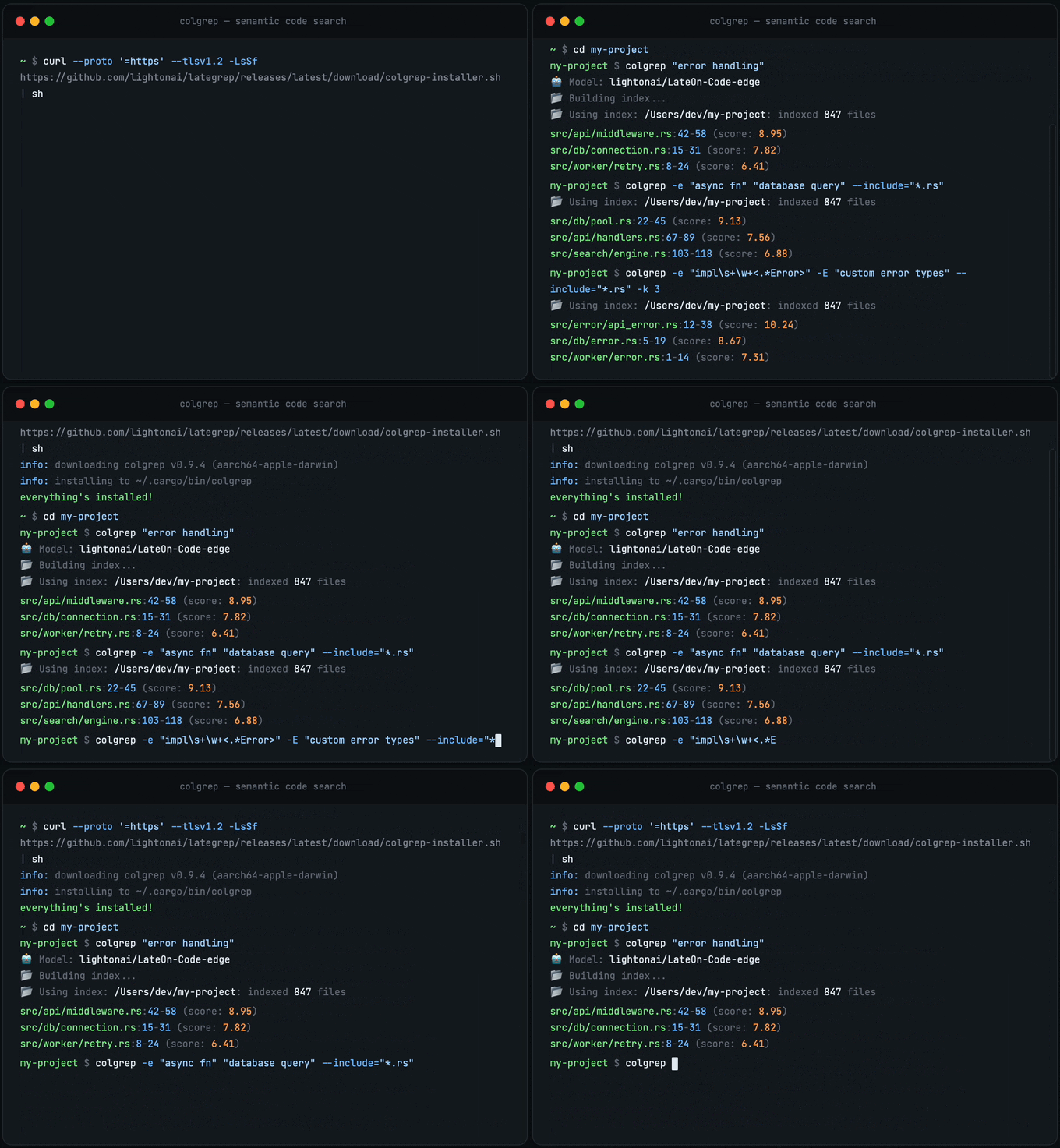
curl --proto '=https' --tlsv1.2 -LsSf https://github.com/lightonai/next-plaid/releases/latest/download/colgrep-installer.sh | sh && "${CARGO_HOME:-$HOME/.cargo}/bin/colgrep" --install-agent
Windows (PowerShell)
irm https://github.com/lightonai/next-plaid/releases/latest/download/colgrep-installer.ps1 | iex
& "$env:USERPROFILE\.cargo\bin\colgrep.exe" --install-agent
colgrep --install-agent downloads the local model behind agent mode (one-time, 2.5 GB): a small model that explores your codebase like a sub-agent and returns the code locations that answer a question. To install colgrep alone, leave it out; you can run it later.
> macOS binaries ship with Apple Accelerate + CoreML enabled — full hardware acceleration out of the box. > > Linux & Windows binaries work immediately but run on CPU only. For hardware acceleration, install via Cargo — see Installation.
Build the index:
colgrep init              # current directory
colgrep init /path/to/project  # or a specific project
colgrep init -y  # auto-confirm for large codebases (>10K code units)
Search:
colgrep "database connection pooling"
Each result is a matching code unit, path:start-end Name (up to 3 per file, best first; documents and loose code have no name):
$ colgrep -k 5 "which terminal commands are refused"
colgrep/README.md:1-953
agent/src/sandbox.rs:1-22
agent/src/sandbox.rs:202-236  Sandbox.run
agent/src/sandbox.rs:3549-3567  fifos_are_refused_not_read
colgrep/src/commands/agent_ui.rs:516-522  cdata_values_are_unwrapped
...
-n N adds N lines of context around the matching lines, -c the code of each unit (up to 50 lines), -l only the file names.
No setup, no config, no dependencies. colgrep init builds the index for the first time. After that, every search detects file changes and updates the index automatically before returning results. Supports --model to override the ColBERT model and --pool-factor to control embedding compression.
Search Modes
ColGREP supports four search modes: semantic, keyword, hybrid (semantic + keyword), and regex.
Semantic + Keyword Hybrid (default)
By default, every query runs both ColBERT semantic search and FTS5 trigram keyword search, fused with Reciprocal Rank Fusion (RRF). This finds code by meaning and by exact identifier/substring matches:
colgrep "database connection pooling"
colgrep "parse_arguments"              # trigram matches substrings
colgrep "authentication middleware" ./src
The trigram tokenizer enables substring matching: searching "parse" finds "parse_arguments", "JSON.parse", etc. The FTS5 index covers all code unit metadata: names, signatures, file paths, source code, docstrings, parameters, imports, and call graph.
Regex Search
Use -e for traditional pattern matching (ERE syntax by default):
colgrep -e "async fn\s+\w+"
colgrep -e "TODO|FIXME|HACK"
colgrep -e "impl\s+Display" --include="*.rs"
Regex + Semantic Hybrid
Combine regex filtering with semantic ranking. Regex narrows the candidates, semantics ranks them:
# Find async functions, rank by "error handling"
colgrep -e "async fn" "error handling"

# Find Result types, rank by "database operations"
colgrep -e "Result<" "database operations" --include="*.rs"

# Find TODOs, rank by relevance to "security"
colgrep -e "TODO" "security concerns"
Pure Semantic Search
Disable keyword fusion with --semantic-only for a single query, or persistently via settings:
# One-shot
colgrep --semantic-only "error handling"

# Persistent
colgrep settings --no-hybrid-search
Agent Mode (--agent)
colgrep --agent hands your question to a small local model trained to localize code with colgrep (lightonai/colgrep-agent-2B-GGUF). It searches the repository, reads the candidates, and returns the locations to look at, each with the name and code of its enclosing function, like a sub-agent that only does code search:
colgrep --agent "sessions never expire after logout"
colgrep --agent "crash when the config file is empty" ./backend -c   # whole ranges, search-style
colgrep --agent --json "where are retries configured"              # for scripts / agents
$ colgrep --agent "where does the agent decide which terminal commands are refused"
agent/src/sandbox.rs:1000-1002  Shell<'a>.build_cmd
   997                          }
   998                      } else if target == "&1" || target == "&2" {
   999                      } else {
  1000                          return Err(format!(
  1001                              "bash: {target}: write refused — the terminal is read-only"
  1002                          ));
  1003                      }
  1004                  }
  1005                  Tok::Op("<") => match it.next() {
Each location is printed as path:start-end Name (the enclosing function, method or class, as in a search result), followed by its numbered code: the whole function when it is at most 40 lines, otherwise the located lines with 3 lines of context, and never more than 40 lines per location. A coding agent that delegates the search can usually answer from this output without opening the files. -c prints the full ranges search-style instead, -l only the files, --json the bare locations.
On a terminal, progress lines (the agent's searches and reads, then a summary with turns, tokens and timings) go to stderr; stdout carries just the locations.
The model downloads on first use; colgrep --install-agent fetches it ahead of time, checks that it loads, and prepares the cache of the prompt every question starts with, so the first question is as fast as the next ones.
Once the model is downloaded (or an endpoint is configured), colgrep's Claude Code hooks also tell the coding agent about colgrep --agent, so it can delegate open-ended "where is X handled?" questions to it. Until then the hooks don't mention it. How much the hooks push the agent is a setting, see Hook mode.
How it works:
- Same harness as training. System prompt, tool schemas (
colgrep,terminal,finish), chat template, observation format and the 10-turn budget are byte-identical to the one the model was trained and evaluated with. - Read-only. The model's terminal is interpreted in-process: no process is ever spawned and no file is opened for writing. Paths are confined to the repository (symlinks included).
cat,head,tail,sed -n,grep,find,wc,awkline ranges, pipes and globs work; redirections,sed -i,find -exec,rm, interpreters andgitare refused. - Searches stay in-process. The index and the ColBERT encoder are loaded once and reused for every search the agent makes.
- Reproducible. The sampling seed is fixed by default: the same question on the same repository state gives the same answer, run after run (
--agent-seed Ndraws another sample). - Local inference on the GPU when there is one, on llama.cpp (GGUF weights), with every turn reusing the KV cache of the previous one:
- Apple Silicon: llama.cpp is built into colgrep and runs on Metal. The static part of the prompt is also cached on disk (
~/Library/Caches/colgrep/agent-prefix).
- Linux, Windows, Intel Macs: on first use colgrep downloads ggml-org's official llama.cpp build for the platform (~30 MB, pinned release, SHA-256 verified, cached under
~/.cache/colgrep/llama.cpp) and runs a privatellama-serverfor the session. It ships CPU kernels for every x86 generation (SSE4.2 to AVX-512, picked at runtime) and ARM64, and a Vulkan backend: NVIDIA, AMD and Intel GPUs are used automatically when their driver is installed (on Linux, if the distribution left out the Vulkan loader, colgrep fetches a pinned one, ~200 KB, SHA-256 verified), the CPU otherwise. The model runs on a single GPU, the one with the most free memory. The server is bound to127.0.0.1and stops with colgrep.
Measured on an M3 Pro (Q8_0 weights, typical 6–10 turn sessions): ~20 s per question on Metal, ~75–90 s on CPU only, 3–4 GB peak memory. The first run after installing a new binary also compiles the Metal shaders once (~20 s). --force-cpu (or --agent-gpu-layers 0) keeps the model on the CPU.
Configuring the agent
Every agent setting lives in colgrep settings and accepts default to go back to the built-in value (--agent-reset resets them all):
colgrep settings                                    # shows the Agent block
colgrep settings --agent-model ~/models/agent.gguf  # local GGUF file, directory, or HF repo
colgrep settings --agent-model-file other-Q4_K_M.gguf
colgrep settings --agent-prompt ./prompt.txt        # replace the system prompt
colgrep settings --agent-tools ./tools.json         # replace the tool schemas
colgrep settings --agent-chat-template ./tpl.jinja  # replace the chat template
colgrep settings --agent-max-turns 6 --agent-search-k 15
colgrep settings --agent-temperature 0 --agent-top-p 0.9 --agent-top-k 40 --agent-seed 7
colgrep settings --agent-context 32768 --agent-max-tokens 1024
colgrep settings --agent-gpu-layers 0               # CPU only (or use --force-cpu per run)
colgrep settings --agent-threads 6                  # default: performance cores
colgrep settings --agent-thinking on                # for models trained with reasoning
colgrep settings --agent-runtime server             # auto (default), builtin (Apple Silicon) or server
colgrep settings --agent-llama-server ~/llama.cpp/build/bin/llama-server  # e.g. your own CUDA build
| Setting | Default |
|---|---|
--agent-model / --agent-model-file | lightonai/colgrep-agent-2B-GGUF / colgrep-agent-2B-Q8_0.gguf |
--agent-max-turns | 10 (the last turn only accepts finish) |
--agent-search-k | 10 hits per search (the model may ask for up to 25) |
--agent-temperature / --agent-top-p / --agent-top-k | 0.6 / 0.95 / 20 (evaluation sampling) |
--agent-max-tokens / --agent-context | 2048 per turn / 16384 |
--agent-seed | 0 (reproducible) |
HF_TOKEN, then HUGGING_FACE_HUB_TOKEN, then the HF token file).
Serving the model on a GPU server
Point the agent at any OpenAI-compatible server; prompts go through /v1/completions, so no server-side tool parser is needed:
# llama-server (--special keeps the tool-call tokens in the output)
llama-server -m colgrep-agent-2B-Q8_0.gguf --port 8000 --special
colgrep settings --agent-endpoint http://localhost:8000/v1
Set COLGREP_AGENT_API_KEY (or OPENAI_API_KEY) if the server needs one. COLGREP_AGENT_DEBUG=1 prints per-turn timings and COLGREP_AGENT_TRACE=trace.json saves the full transcript.
CLI Reference
Search Options
| Flag | Long | Description |
|---|---|---|
-e | --pattern | Regex pre-filter (ERE syntax) |
-E | --extended-regexp | ERE mode (default, kept for grep compat) |
-F | --fixed-strings | Treat -e as literal string |
-w | --word-regexp | Whole-word match for -e |
-k | --results | Number of results (default: 15) |
-n | --lines | Context lines to show (default: 6) |
-l | --files-only | List matching files only |
-c | --content | Show full function/class content |
-r | --recursive | Recursive (default, for grep compat) |
-y | --yes | Auto-confirm indexing |
--json | JSON output | |
--code-only | Skip docs/config files | |
--semantic-only | Disable hybrid search (pure semantic) | |
--include | Filter by glob (e.g., "*.rs") | |
--exclude | Exclude files by glob | |
--exclude-dir | Exclude directories | |
--model | Override ColBERT model | |
--no-pool | Disable embedding pooling | |
--pool-factor | Set pool factor (default: 2) |
Filtering
# By file extension
colgrep --include="*.py" "database query"
colgrep --include="*.{ts,tsx}" "React component"

# By path pattern
colgrep --include="src/**/*.rs" "config parsing"
colgrep --include="**/tests/**" "test helper"

# Exclude files or directories
colgrep --exclude="*.test.ts" "component"
colgrep --exclude-dir="vendor" --exclude-dir="node_modules" "import"

# Search specific paths
colgrep "error handling" ./src/api ./src/auth

# Code-only (skip markdown, yaml, json, etc.)
colgrep --code-only "authentication logic"
Glob pattern syntax:
| Pattern | Matches |
|---|---|
*.py | All Python files |
*.{ts,tsx} | TypeScript and TSX files |
src/**/*.rs | Rust files under src/ |
**/tests/** | Files in any tests/ directory |
*_test.go | Go test files |
Output Modes
# Default: filepath:lines with context
colgrep "authentication"

# Files only (like grep -l)
colgrep -l "database queries"

# Full content with syntax highlighting
colgrep -c "authentication handler" -k 5

# JSON for scripting
colgrep --json "auth" | jq '.[] | .unit.file'
Subcommands
| Command | Description |
|---|---|
colgrep init | Build or update the index |
colgrep status | Show index status for current project |
colgrep clear | Clear index for current project |
colgrep clear --all | Clear all indexes |
colgrep set-model <ID> | Change the default ColBERT model |
colgrep settings | View or modify configuration |
colgrep settings --ignore | Add extra ignore patterns (persistent) |
colgrep settings --force-include | Force-include normally ignored paths |
colgrep --stats | Show search statistics for all indexes |
Configuration
# Show current config
colgrep settings

# Set default results count
colgrep settings --k 20

# Set default context lines
colgrep settings --n 10

# What the Claude Code hooks advertise: hybrid (default), agent or colgrep
colgrep settings --hook-mode agent

# Use INT8 quantized model (faster inference)
colgrep settings --int8

# Force FP32 full precision (more accurate)
colgrep settings --fp32

# Reset precision to the build default (FP32 on CUDA, INT8 otherwise)
colgrep settings --default-precision

# macOS/CoreML: compiled models are cached by default under
# ~/Library/Caches/next-plaid/coreml (persists across runs = faster startup, and
# avoids the restricted-$TMPDIR failure). Override the location if you want:
colgrep settings --coreml-cache-dir ~/Library/Caches/colgrep/coreml
# (revert to the default location with: colgrep settings --clear-coreml-cache-dir)

# Set embedding pool factor (2 = 50% smaller index, 1 = full precision)
colgrep settings --pool-factor 2

# Store embeddings as 1-bit signs (~4x smaller index, faster search)
colgrep settings --binary

# Back to residual embedding storage (this is the default)
colgrep settings --no-binary

# Set parallel encoding sessions (persists across sessions and all indexes)
# Default: CPU count (max 16) on CPU; 1 on GPU/CoreML. Use 0 to reset to auto.
colgrep settings --parallel 8

# Set batch size per session (default: 1 for CPU, 64 for CUDA)
colgrep settings --batch-size 2

# Set parser recursion depth guard (default: 1024)
colgrep settings --max-recursion-depth 1024

# Enable verbose output by default
colgrep settings --verbose

# Reset a value to default (pass 0)
colgrep settings --k 0 --n 0
Indexing Speed vs. Memory
Cold indexing encodes every code unit with the ColBERT model. colgrep runs several ONNX sessions in parallel to speed this up, and the pipeline queues between encoding and index writing are bounded so memory stays flat regardless of repo size.
The number of parallel sessions is the main speed/memory knob, and it is a **persistent setting** — set it once and it applies to every future colgrep run and every index:
# Use more sessions for faster indexing on multi-core machines
colgrep settings --parallel 8

# Use a single session to minimise memory (recommended on GPU/CoreML,
# where each session is a full copy of the model in device memory)
colgrep settings --parallel 1

# Reset to the automatic default
colgrep settings --parallel 0
Default when unset (--parallel 0):
| Execution provider | Default sessions | Why |
|---|---|---|
| CPU | CPU core count (max 16) | Fastest; bounded queues keep memory in check even at many cores |
| GPU / CoreML / DirectML | 1 | Each session duplicates the model in device memory |
a modest, bounded memory increase. On accelerator builds the trade-off is steeper, so the default stays at 1 — raise it explicitly with --parallel if you have the device memory.
Binary Embedding Storage
colgrep settings --binary switches index storage from residual codes to packed 1-bit signs, scored with asymmetric binary MaxSim (int8 query × 1-bit documents). Indexes shrink ~4x and Stage-2 scoring gets faster, at a small ranking-quality cost. Like all settings values it is persistent: it applies to every future index and, when toggled, existing indexes are automatically re-embedded the next time they are updated or searched.
# Opt in (persisted in ~/.config/colgrep/config.json)
colgrep settings --binary

# Revert to the default residual storage
colgrep settings --no-binary
Trade-offs to know about:
- Incremental updates are disabled. Binary indexes cannot take appends, so
suited to small/medium repos or workflows where the index is built once.
- Quality depends on embedding dimension. Binarization retains ranking
(dim ≤ 64). colgrep's default model (LateOn-Code-edge) produces 48-dim embeddings, so with the default model expect a real quality drop — verify search quality on your repo before adopting it, or pair --binary with a higher-dimension model.
Hook mode
colgrep settings --hook-mode chooses what colgrep's Claude Code hooks tell the coding agent to search with:
| Mode | The hooks tell the coding agent to use |
|---|---|
hybrid (default) | plain colgrep for names, error messages and patterns, and colgrep --agent as a first step for questions about behaviour |
agent | colgrep --agent as its search tool |
colgrep | plain colgrep only, never colgrep --agent |
colgrep settings --hook-mode agent     # delegate code search to colgrep --agent
colgrep settings --hook-mode colgrep   # plain colgrep only
colgrep settings --hook-mode default   # back to hybrid
colgrep --agent is only mentioned once its model is downloaded (or an endpoint is configured): until then, hybrid and agent behave like colgrep. The mode applies to new sessions.
Measured with a coding agent (Sonnet 5.5) on 52 code-search questions over 13 repositories, 3 runs each:
colgrep | hybrid | agent | |
|---|---|---|---|
Sessions that call colgrep --agent | 0% | 51% | 100% |
| Tokens vs. no colgrep | −25% | −21% | −34% |
| Time per question (13.0 s without colgrep) | 15.0 s | 17.7 s | 21.6 s |
agent uses the fewest tokens, colgrep is the fastest, and hybrid lets the coding agent choose; the differences in answer accuracy were not significant.
Hybrid Search
By default, colgrep fuses ColBERT semantic search with FTS5 trigram keyword search using Reciprocal Rank Fusion (RRF). This improves recall for exact identifier matches with negligible indexing overhead. You can disable it persistently:
# Disable hybrid search (pure semantic mode)
colgrep settings --no-hybrid-search

# Re-enable hybrid search (default)
colgrep settings --hybrid-search
The --semantic-only CLI flag works as a one-shot override without changing the setting.
Relative Paths
By default, colgrep displays absolute file paths in search output. You can switch to relative paths (relative to the current working directory) to improve readability and save ~35% tokens when used with LLMs:
# Enable relative paths
colgrep settings --relative-paths

# Revert to absolute paths (default)
colgrep settings --no-relative-paths
> Note: JSON output (--json) always uses absolute paths regardless of this setting.
Custom Ignore & Force-Include
By default, colgrep ignores common non-source directories (node_modules, .git, target, vendor, build, etc.) and hidden files. You can customize this behavior persistently across sessions:
# Add extra patterns to ignore (on top of built-in defaults)
colgrep settings --ignore generated --ignore "*.pb.go"

# Remove an extra ignore pattern
colgrep settings --no-ignore generated

# Clear all extra ignore patterns (revert to defaults only)
colgrep settings --clear-ignore

# Force-include files/dirs that are normally ignored
colgrep settings --force-include .vscode
colgrep settings --force-include vendor/internal

# Remove a force-include pattern
colgrep settings --no-force-include .vscode

# Clear all force-include patterns
colgrep settings --clear-force-include
Pattern syntax:
| Pattern | Matches |
|---|---|
generated | Any directory or file named generated |
*.pb.go | Files ending in .pb.go |
.vscode | The .vscode directory (normally hidden = ignored) |
vendor/internal | The vendor/internal path prefix specifically |
~/.config/colgrep/config.json and apply to all projects.
Change Model
# Temporary (single query)
colgrep "query" --model lightonai/LateOn-Code

# Permanent (clears existing indexes)
colgrep set-model lightonai/LateOn-Code

# Private HuggingFace model
HF_TOKEN=hf_xxx colgrep set-model myorg/private-model
Config stored at ~/.config/colgrep/config.json.
Agent Integrations
| Agent | Install | Uninstall |
|---|---|---|
| Claude Code | colgrep --install-claude-code | colgrep --uninstall-claude-code |
| OpenCode | colgrep --install-opencode | colgrep --uninstall-opencode |
| Codex | colgrep --install-codex | colgrep --uninstall-codex |
| Hermes | colgrep --install-hermes | colgrep --uninstall-hermes |
| Kimi Code | colgrep --install-kimi | colgrep --uninstall-kimi |
Claude Code Integration
The Claude Code integration installs session and task hooks that:
- Inject colgrep usage instructions into the agent's system prompt
- Activate when the project (or a parent) already has a colgrep index, even an outdated one, or when it has fewer than 5,000 code blocks, small enough to index on the first search. The count stops at 5,000 and within one second, so it stays instant on huge repositories.
- Propagate colgrep instructions to spawned sub-agents via task hooks
- Follow the hook mode: plain
colgrep,colgrep --agent, or both (the default)
This means Claude Code automatically uses colgrep as its primary search tool wherever it is ready to answer.
Kimi Code Integration
The Kimi Code integration installs a skill at ~/.kimi-code/skills/colgrep/SKILL.md (or $KIMI_CODE_HOME/skills/colgrep/SKILL.md when KIMI_CODE_HOME is set) that teaches the agent to use colgrep as its primary search tool. New sessions pick it up automatically.
Complete Uninstall
Remove colgrep from all AI tools, clear all indexes, and delete all data:
colgrep --uninstall
How It Works
flowchart TD
    A["Your codebase"] --> B["Tree-sitter"]
    B --> C["Structured representation"]
    C --> D["LateOn-Code-edge · 17M"]
    D --> E["NextPlaid"]
    E --> F["Search"]

    B -.- B1["Parse functions, methods, classes"]
    C -.- C1["Signature, params, calls, docstring, code"]
    D -.- D1["Multi-vector embedding per code unit · runs on CPU"]
    E -.- E1["Rust index binary · quantized · memory-mapped · incremental"]
    F -.- F1["grep-compatible flags · SQLite filtering · semantic ranking
100% local, your code never leaves your machine"]

    style A fill:#4a90d9,stroke:#357abd,color:#fff
    style B fill:#50b86c,stroke:#3d9956,color:#fff
    style C fill:#50b86c,stroke:#3d9956,color:#fff
    style D fill:#e8913a,stroke:#d07a2e,color:#fff
    style E fill:#e8913a,stroke:#d07a2e,color:#fff
    style F fill:#9b59b6,stroke:#8445a0,color:#fff
    style B1 fill:none,stroke:#888,stroke-dasharray:5 5,color:#888
    style C1 fill:none,stroke:#888,stroke-dasharray:5 5,color:#888
    style D1 fill:none,stroke:#888,stroke-dasharray:5 5,color:#888
    style E1 fill:none,stroke:#888,stroke-dasharray:5 5,color:#888
    style F1 fill:none,stroke:#888,stroke-dasharray:5 5,color:#888
1. Parse
Tree-sitter parses source files into ASTs and extracts code units: functions, methods, classes, constants, and raw code blocks (module-level statements not covered by other units). This gives 100% file coverage.
2. Analyze (5 Layers)
Each code unit is enriched with five layers of analysis:
| Layer | Extracts | Example |
|---|---|---|
| AST | Signature, parameters, return type, docstring, parent class | def fetch(url: str) -> Response |
| Call Graph | Outgoing calls + reverse called_by | Calls: range, client.get |
| Control Flow | Loops, branches, error handling, cyclomatic complexity | has_error_handling: true |
| Data Flow | Variable declarations and assignments | Variables: i, e |
| Dependencies | Imports used within the function | Uses: client, RequestError |
3. Build Structured Text
Each unit is converted to a structured text representation before embedding. This gives the model richer signal than raw code alone:
Function: fetch_with_retry
Signature: def fetch_with_retry(url: str, max_retries: int = 3) -> Response
Description: Fetches data from a URL with retry logic.
Parameters: url, max_retries
Returns: Response
Calls: range, client.get
Variables: i, e
Uses: client, RequestError
Code:
def fetch_with_retry(url: str, max_retries: int = 3) -> Response:
    """Fetches data from a URL with retry logic."""
    for i in range(max_retries):
        try:
            return client.get(url)
        except RequestError as e:
            if i == max_retries - 1:
                raise e
File: src / utils / http client http_client.py
File paths are normalized for better semantic matching: separators become spaces, snake_case and CamelCase are split (e.g., HttpClient → http client).
4. Encode with ColBERT
The ColBERT model produces multi-vector embeddings: ~300 token-level vectors of dimension 128 per code unit (instead of a single vector). At query time, each query token finds its best match across all document tokens (MaxSim scoring). This preserves fine-grained information that single-vector models lose.
The default model is LateOn-Code-edge (17M parameters), optimized for code search and fast enough to run on CPU.
5. Index with PLAID
The PLAID algorithm compresses multi-vector embeddings with product quantization (2-bit or 4-bit) and stores them in a memory-mapped index. Embedding pooling (default factor: 2) further reduces index size by ~50%. Indexes support incremental updates so only changed files are re-encoded.
6. Search
The search pipeline:
- Encode the query with ColBERT (single ONNX session, fast)
- Pre-filter by metadata if
--include,--exclude,--exclude-diror--code-onlyare set (SQLite) - If
-epattern is provided: regex filter candidates, then score semantically - ColBERT MaxSim scoring against the PLAID index
- FTS5 BM25 keyword search against trigram-indexed metadata (names, code, paths, signatures)
- RRF fusion merges semantic and keyword rankings (alpha=0.75 favoring semantic)
- Demote test functions unless the query mentions "test"
- Find representative lines using weighted token matching with a sliding window
Index Management
colgrep init
Build or incrementally update the index for a project without running a search. If the index already exists, only changed files are re-encoded.
colgrep init                                        # current directory
colgrep init ~/projects/myapp                       # specific project
colgrep init -y                                     # auto-confirm for large codebases (>10K code units)
colgrep init --model lightonai/LateOn-Code          # use a specific model
colgrep init --pool-factor 1                        # disable embedding pooling (more precise)
This is useful for:
- Pre-warming the index so the first search is instant
- CI/dev setup scripts where you want indexing to happen ahead of time
- Updating the index after pulling new code
# Check index status
colgrep status

# Clear current project index
colgrep clear

# Clear all indexes
colgrep clear --all

# Show statistics
colgrep --stats
Indexes are stored outside the project directory:
| Platform | Location |
|---|---|
| Linux | ~/.local/share/colgrep/indices/ |
| macOS | ~/Library/Application Support/colgrep/indices/ |
| Windows | %APPDATA%\colgrep\indices\ |
XDG_DATA_HOME is honored on all platforms, including macOS — set it to keep your colgrep data under ~/.local/share (or anywhere else) on macOS too.
Each project gets a directory named {project}-{hash8}. Inside:
index/— PLAID vector index + SQLite metadatastate.json— File hashes for incremental updatesproject.json— Canonical project path
ColGREP automatically detects and repairs index/metadata desync from interrupted operations.
Supported Languages
Code (65 languages, split into functions, classes and definitions)
| Language | Extensions |
|---|---|
| Python | .py, .pyi; Cython .pyx, .pxd, .pxi |
| Jupyter notebooks | .ipynb (code cells in the kernel's language, markdown cells as text; outputs skipped) |
| TypeScript | .ts, .tsx, .mts, .cts |
| JavaScript | .js, .jsx, .mjs, .cjs |
| Go | .go |
| Rust | .rs |
| Java | .java |
| C | .c, .h; OpenCL .cl kernels |
| C++ | .cpp, .cc, .cxx, .hpp, .hxx, .hh, .h++, .c++, .inl, .ipp, .tpp, .txx; Arduino .ino; Metal .metal |
| CUDA / HIP | .cu, .cuh, .hip |
| Objective-C | .m, .mm |
| C# | .cs |
| F# | .fs, .fsi, .fsx |
| Dart | .dart |
| Ruby | .rb, .rake, .gemspec, Rakefile, Gemfile, Vagrantfile |
| Kotlin | .kt, .kts |
| Swift | .swift |
| Scala | .scala, .sc, .sbt |
| PHP | .php |
| Perl | .pl, .pm, .t |
| Lua | .lua |
| Luau | .luau |
| Elixir | .ex, .exs |
| Erlang | .erl, .hrl, .app.src, rebar.config |
| Gleam | .gleam |
| Haskell | .hs |
| OCaml | .ml, .mli |
| Elm | .elm |
| Clojure | .clj, .cljs, .cljc, .edn |
| Scheme | .scm, .ss, .sld, .sls |
| Racket | .rkt, .rktl |
| Common Lisp | .lisp, .lsp, .asd, .cl |
| R | .r, .rmd |
| Julia | .jl |
| MATLAB | .m |
| Fortran | .f, .for, .ftn, .f77, .f90, .f95, .f03, .f08 |
| Zig | .zig |
| D | .d, .di |
| Odin | .odin |
| Pascal / Delphi | .pas, .pp, .dpr, .lpr |
| Assembly | .asm, .s, .S, .nasm |
| GLSL | .glsl, .vert, .frag, .geom, .comp, .tesc, .tese, .rgen, .rchit, .rmiss, .rahit, .rint, .rcall |
| HLSL | .hlsl, .hlsli, .fx, .fxh |
| Verilog / SystemVerilog | .v, .vh, .sv, .svh |
| VHDL | .vhd, .vhdl |
| Solidity | .sol |
| GDScript | .gd |
| SQL | .sql |
| Vue | .vue |
| Svelte | .svelte |
| HTML | .html, .htm |
| QML | .qml |
| CSS | .css |
| SCSS / Sass | .scss, .sass |
| Less | .less |
| Nix | .nix |
| Terraform / HCL | .tf, .tfvars, .hcl |
| Shell | .sh, .bash, .zsh |
| PowerShell | .ps1, .psm1, .psd1 |
| Protocol Buffers | .proto |
| GraphQL | .graphql, .gql |
| Starlark / Bazel | .bzl, .star, BUILD, WORKSPACE, MODULE.bazel |
| CMake | .cmake, CMakeLists.txt |
| Groovy | .groovy, .gradle, Jenkinsfile |
| INI | .ini, .cfg, .properties, .service, .timer, .socket |
.m (Objective-C or MATLAB), .cl (Common Lisp or OpenCL), .v (Verilog or Coq, indexed as text), .sls (Scheme or SaltStack YAML), .pp (Pascal or Puppet, skipped), and .d (D, or a compiler-generated dependency file, skipped).
Text & Config (11 formats, document-level extraction)
| Format | Extensions |
|---|---|
| Markdown | .md, .mdx |
| Plain text | .txt, .rst |
| AsciiDoc | .adoc |
| Org | .org |
| LaTeX | .tex, .ltx, .sty, .cls, .bib |
| XML | .xml, .xsd, .xsl, .xslt, .xaml, .axaml, .csproj, .vbproj, .fsproj, .vcxproj, .props, .targets, .nuspec, .plist |
| YAML | .yaml, .yml |
| TOML | .toml |
| JSON | .json, .jsonc, .json5 |
| Dockerfile | Dockerfile |
| Makefile | Makefile, .mk |
Installation
The pre-built binaries from Quick Start are the fastest way to get started. For hardware acceleration on Linux/Windows, or to build from source, use Cargo.
Cargo
Install from crates.io:
# CPU-only (all platforms)
cargo install colgrep

# macOS with full acceleration (same as pre-built binary)
cargo install colgrep --features "accelerate,coreml"

# Linux with OpenBLAS
cargo install colgrep --features openblas

# Linux with CUDA
cargo install colgrep --features cuda

# Linux with CUDA + TensorRT
cargo install colgrep --features "cuda,tensorrt"

# Windows with DirectML
cargo install colgrep --features directml
Build from Source
git clone https://github.com/lightonai/next-plaid.git
cd next-plaid
cargo install --path colgrep --features "accelerate,coreml"  # or your preferred features
Hardware Acceleration Features
| Feature | Platform | Description |
|---|---|---|
accelerate | macOS | Apple Accelerate for vector operations |
coreml | macOS | CoreML for model inference |
openblas | Linux | OpenBLAS for vector operations |
cuda | Linux/Windows | NVIDIA CUDA for model inference |
tensorrt | Linux | NVIDIA TensorRT for model inference |
directml | Windows | DirectML for model inference |
OpenBLAS setup (Linux)
__CODE_BLOCK_32__ Then: __INLINE_CODE_423__ONNX Runtime
ONNX Runtime is downloaded automatically on first use. No manual installation required.
Lookup order:
ORT_DYLIB_PATHenvironment variable- Python environments (pip/conda/venv)
- System paths
- Auto-download to
~/.cache/onnxruntime/
Environment Variables
| Variable | Description |
|---|---|
ORT_DYLIB_PATH | Path to ONNX Runtime library |
XDG_DATA_HOME | Override data directory |
XDG_CONFIG_HOME | Override config directory |
HF_TOKEN | HuggingFace token for private models |
HUGGING_FACE_HUB_TOKEN | Alternative HF token variable |
Citation
@software{next-plaid,
  title        = {NextPlaid, ColGREP: Multi-vector search, from database to coding agents.},
  url          = {https://github.com/lightonai/next-plaid},
  author       = {Sourty, Rapha\"{e}l},
  contributors = {Dinaburg, Artem and Carron, Igor and Hsu, Chao-Chun (Joe) and Weitekamp, Raymond and R\k{a}czka, Szymon and Motliuk, Mark},
  year         = {2026},
}

@misc{LateOn-Code,
  title  = {LateOn-Code: a Family of State-Of-The-Art Late Interaction Code Retrieval Models},
  author = {Chaffin, Antoine},
  url    = {https://huggingface.co/collections/lightonai/lateon-code},
  year   = {2026}
}
License
Apache-2.0
See Also
CUDA 13 support
> TL;DR — CUDA 13 works, but you must build from source with --features cuda-13. > The prebuilt curl ... | sh binary is compiled for CUDA 11.8 / 12.x (the right > default for most hosts). On a CUDA-13-only host it silently falls back to the CPU, > because cudarc / ONNX Runtime resolve the CUDA-12 SONAMEs. cudarc binds a single CUDA > major version at compile time, so CUDA 13 cannot ship in the same default binary.
Build the CUDA-13 variant from source (do not also enable cuda — the two are mutually exclusive and won't compile together):
cargo install colgrep --features cuda-13
# or, from a checkout:  cargo build --release -p colgrep --features cuda-13
Advice for running on a CUDA 13 host:
- cuDNN / CUDA 12 runtime libs. colgrep auto-downloads the GPU ONNX Runtime, but its
LD_LIBRARY_PATH (the
nvidia-cudnn-cu12, nvidia-cublas-cu12, nvidia-cuda-runtime-cu12, ... pip wheels work well). These run fine on the backward-compatible CUDA 13 driver.
- Match NVRTC to the driver. The k-means / codec kernels are JIT-compiled with NVRTC.
hit CUDA_ERROR_UNSUPPORTED_PTX_VERSION; put a NVRTC redistributable matching the driver's CUDA version first on LD_LIBRARY_PATH.
- Verify it's really on the GPU. Run
colgrep init <repo> --force-gpu.--force-gpu
genuinely ran on the GPU (auto mode falls back to CPU silently).